
Microsoft Defender Antivirus is Microsoft’s built-in security solution designed to protect Windows devices from viruses, malware, ransomware, potentially unwanted applications (PUAs), and other cyber threats.
One of the most valuable troubleshooting and monitoring tools available to administrators and security professionals is the Microsoft Defender Antivirus Operational Log, which records security events, scans, updates, threat detections, configuration changes, and service health information.
This article explains how to access Microsoft Defender Antivirus events and provides a comprehensive overview of the most important Event IDs.
How to View Microsoft Defender Antivirus Events
Microsoft Defender Antivirus logs its operational events in the Windows Event Viewer.
Steps to Access Defender Events
- Press Windows Key + R.
- Type eventvwr.msc and click OK.
- Navigate to Applications and Services Logs -> Microsoft -> Windows -> Windows Defender -> Operational
- Browse the event list to locate specific Defender events.
- Use Find or Filter Current Log from the Actions pane to quickly locate relevant Event IDs.
- Select an event to view detailed information in the General and Details tabs.
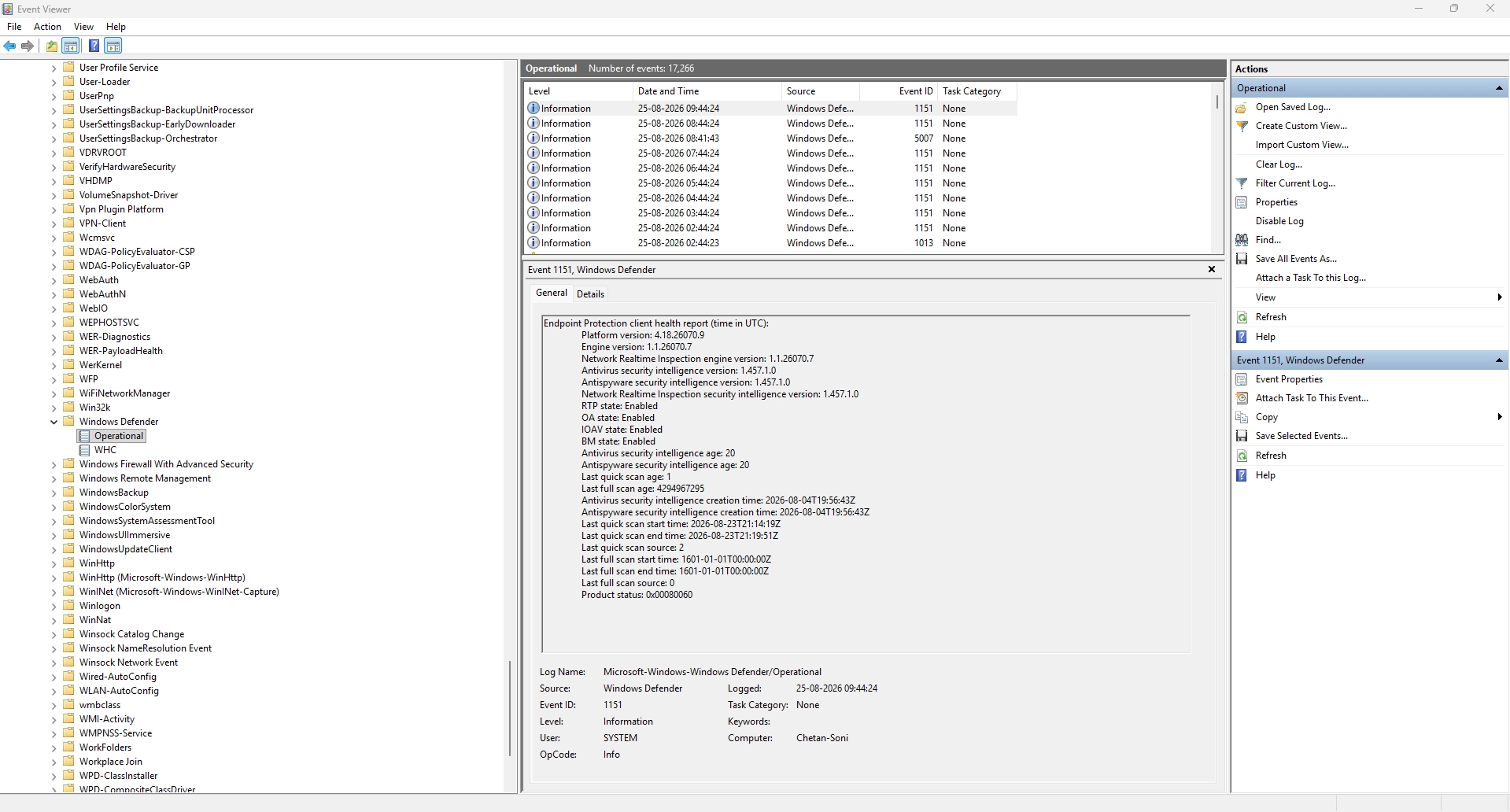
These logs help administrators investigate malware detections, verify antivirus updates, monitor scan activity, and troubleshoot Defender-related issues.
| Event ID | Symbolic Name | Description |
|---|---|---|
| 1000 | MALWAREPROTECTION_SCAN_STARTED | An antimalware scan started. |
| 1001 | MALWAREPROTECTION_SCAN_COMPLETED | An antimalware scan finished successfully. |
| 1002 | MALWAREPROTECTION_SCAN_CANCELLED | A scan was stopped before completion. |
| 1006 | MALWAREPROTECTION_MALWARE_DETECTED | Malware or potentially unwanted software was detected. |
| 1015 | MALWAREPROTECTION_BEHAVIOR_DETECTED | Suspicious behavior was detected. |
| 1120 | MALWAREPROTECTION_THREAT_HASH | Defender calculated hashes for a detected threat resource. |
| 1121 | N/A | Attack Surface Reduction (ASR) rule triggered in block mode. |
| 1127 | MALWAREPROTECTION_FOLDER_GUARD_SECTOR_BLOCK | Controlled Folder Access blocked an untrusted process. |
| 1008 | MALWAREPROTECTION_MALWARE_ACTION_FAILED | Malware remediation action failed. |
| 1117 | MALWAREPROTECTION_STATE_MALWARE_ACTION_TAKEN | Successful action taken against malware. |
| 1118 | MALWAREPROTECTION_STATE_MALWARE_ACTION_FAILED | Malware action attempt failed. |
| 1119 | MALWAREPROTECTION_STATE_MALWARE_ACTION_CRITICALLY_FAILED | Critical failure occurred while attempting remediation. |
| 1009 | MALWAREPROTECTION_QUARANTINE_RESTORE | Item restored from quarantine. |
| 1010 | MALWAREPROTECTION_QUARANTINE_RESTORE_FAILED | Failed to restore quarantined item. |
| 1011 | MALWAREPROTECTION_QUARANTINE_DELETE | Item deleted from quarantine. |
| 1012 | MALWAREPROTECTION_QUARANTINE_DELETE_FAILED | Failed to delete quarantined item. |
| 1013 | MALWAREPROTECTION_MALWARE_HISTORY_DELETE | Malware history was deleted. |
| 1014 | MALWAREPROTECTION_MALWARE_HISTORY_DELETE_FAILED | Malware history deletion failed. |
| 1150 | MALWAREPROTECTION_SERVICE_HEALTHY | Defender service is healthy and operational. |
| 1151 | MALWAREPROTECTION_SERVICE_HEALTH_REPORT | Endpoint Protection health report generated. |
| 2000 | MALWAREPROTECTION_SIGNATURE_UPDATED | Security intelligence updated successfully. |
| 2001 | MALWAREPROTECTION_SIGNATURE_UPDATE_FAILED | Security intelligence update failed. |
| 2004 | MALWAREPROTECTION_SIGNATURE_REVERSION | Reverted to last known good definitions. |
| 2010 | MALWAREPROTECTION_SIGNATURE_FASTPATH_UPDATED | Cloud protection retrieved additional intelligence. |
| 2011 | MALWAREPROTECTION_SIGNATURE_FASTPATH_DELETED | Outdated dynamic definitions deleted. |
| 2012 | MALWAREPROTECTION_SIGNATURE_FASTPATH_UPDATE_FAILED | Dynamic Signature Service failed. |
| 2013 | MALWAREPROTECTION_SIGNATURE_FASTPATH_DELETED_ALL | All dynamic definitions deleted. |
| 2050 | MALWAREPROTECTION_SAMPLESUBMISSION_UPLOADED | File submitted for cloud analysis. |
| 2002 | MALWAREPROTECTION_ENGINE_UPDATED | Antimalware engine updated successfully. |
| 2003 | MALWAREPROTECTION_ENGINE_UPDATE_FAILED | Engine update failed. |
| 2005 | MALWAREPROTECTION_ENGINE_UPDATE_PLATFORMOUTOFDATE | Platform outdated and unable to load engine. |
| 2006 | MALWAREPROTECTION_PLATFORM_UPDATE_FAILED | Platform update failed. |
| 2007 | MALWAREPROTECTION_PLATFORM_ALMOSTOUTOFDATE | Platform nearing end of support. |
| 2020 | MALWAREPROTECTION_CLOUD_CLEAN_RESTORE_FILE_DOWNLOADED | Clean replacement file downloaded. |
| 2021 | MALWAREPROTECTION_CLOUD_CLEAN_RESTORE_FILE_DOWNLOAD_FAILED | Failed to download clean file. |
| 2030 | MALWAREPROTECTION_OFFLINE_SCAN_INSTALLED | Offline scan configured for next restart. |
| 2031 | MALWAREPROTECTION_OFFLINE_SCAN_INSTALL_FAILED | Failed to configure offline scan. |
| 2040 | MALWAREPROTECTION_OS_EXPIRING | OS support will soon end. |
| 2041 | MALWAREPROTECTION_OS_EOL | Operating system support has ended. |
| 2042 | MALWAREPROTECTION_PROTECTION_EOL | Defender no longer protects this operating system. |
| 3002 | MALWAREPROTECTION_RTP_FEATURE_FAILURE | Real-time protection encountered a failure. |
| 3007 | MALWAREPROTECTION_RTP_FEATURE_RECOVERED | Real-time protection recovered from failure. |
| 5000 | MALWAREPROTECTION_RTP_ENABLED | Real-time protection enabled. |
| 5001 | MALWAREPROTECTION_RTP_DISABLED | Real-time protection disabled. |
| 5004 | MALWAREPROTECTION_RTP_FEATURE_CONFIGURED | Real-time protection settings changed. |
| 5007 | MALWAREPROTECTION_CONFIG_CHANGED | Defender configuration changed. |
| 5013 | MALWAREPROTECTION_SCAN_CANCELLED | Tamper Protection blocked a configuration change. |
| 5009 | MALWAREPROTECTION_ANTISPYWARE_ENABLED | Antispyware scanning enabled. |
| 5010 | MALWAREPROTECTION_ANTISPYWARE_DISABLED | Antispyware scanning disabled. |
| 5011 | MALWAREPROTECTION_ANTIVIRUS_ENABLED | Antivirus scanning enabled. |
| 5012 | MALWAREPROTECTION_ANTIVIRUS_DISABLED | Antivirus scanning disabled. |
| 5008 | MALWAREPROTECTION_ENGINE_FAILURE | Antimalware engine failed. |
| 5100 | MALWAREPROTECTION_EXPIRATION_WARNING_STATE | Antimalware platform will expire soon. |
| 5101 | MALWAREPROTECTION_DISABLED_EXPIRED_STATE | Antimalware platform has expired. |
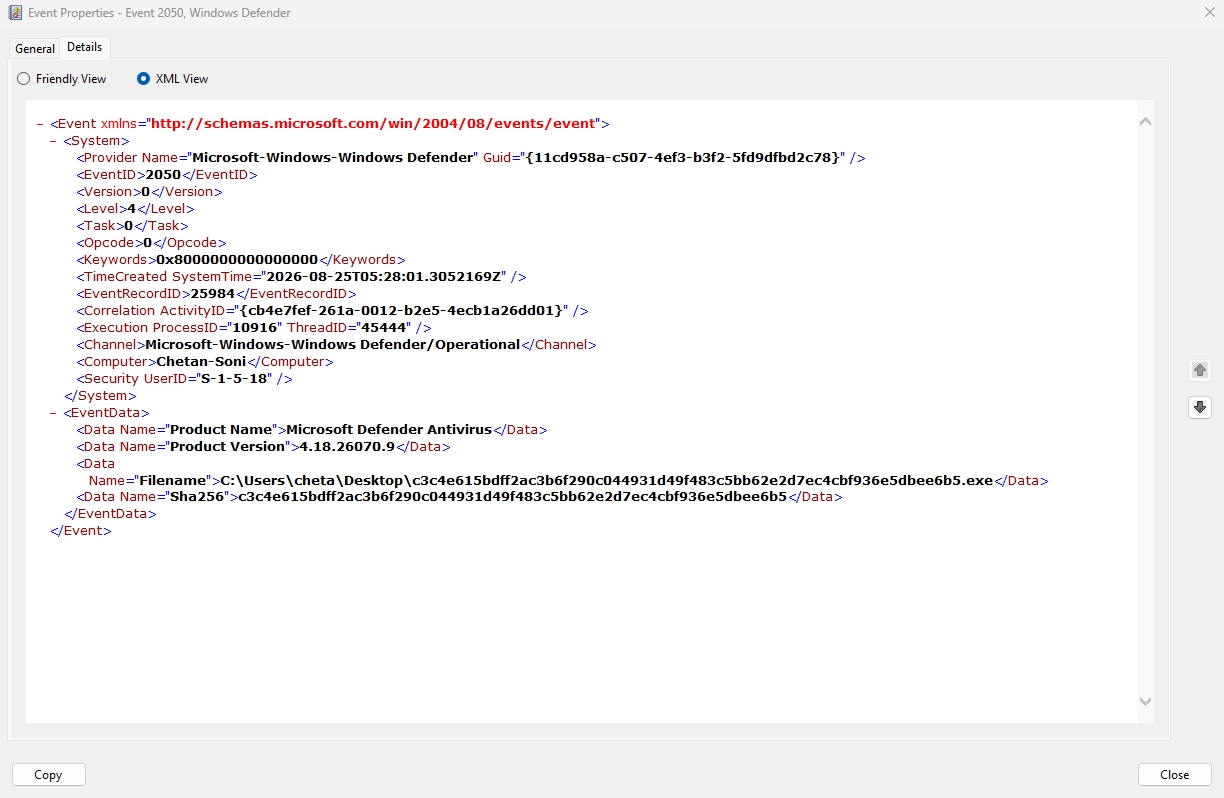
As an example, a test executable was used to verify Microsoft Defender Antivirus event generation and logging behavior. The test successfully triggered Windows Defender Operational Event ID 2050, confirming that Microsoft Defender Antivirus correctly processed and recorded the file activity.
The generated event captured key forensic details including the file path, SHA256 hash, Defender product version, device name, process and thread identifiers, activity correlation ID, and event timestamp.
This validation demonstrates that Defender’s detection and telemetry pipeline is functioning as expected, ensuring that relevant security events are available for downstream monitoring, threat hunting, incident investigation, and SIEM/SOC integrations.
The successful generation of Event ID 2050 provides confidence that endpoint security events can be reliably collected and analyzed for operational security monitoring.
Conclusion
Microsoft Defender Antivirus Event Viewer logs provide critical visibility into scans, malware detections, remediation actions, updates, service health, and configuration changes. By understanding key Event IDs, administrators can quickly troubleshoot security issues, verify protection status, investigate threats, and maintain a secure Windows environment.
Among all Defender events, administrators should pay particular attention to:
- 1006 – Malware detected
- 1117 – Malware action taken
- 2000 – Security intelligence updated successfully
- 2001 – Security intelligence update failed
- 3002 – Real-time protection failure
- 5001 – Real-time protection disabled
- 5007 – Configuration changed
- 5013 – Tamper Protection blocked a change
Regular monitoring of these events can significantly enhance an organization’s security posture and ensure Microsoft Defender Antivirus continues to protect endpoints effectively.