

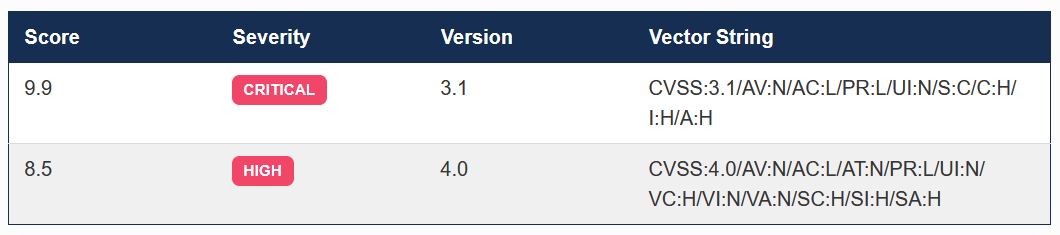
On September 10, 2026, AWS disclosed CVE-2026-89049, a critical vulnerability affecting the AWS Systems Manager (SSM) Agent. With a CVSS score of 9.9, the announcement understandably raised concerns across the cloud security community.
However, as with many high-severity vulnerabilities, the actual risk depends heavily on how your AWS environment is configured and which permissions are granted to users.
In this article, we’ll explore:
- What CVE-2026-89049 is
- How attackers can potentially exploit it
- Why its impact varies between organizations
- What evidence appears in AWS CloudTrail
- How to use CloudTrail and the AWS CLI to identify potentially suspicious activity
- Recommended investigation and remediation steps
By the end, you’ll know exactly where to look and what to search for when assessing whether your AWS environment may have been targeted.
Understanding CVE-2026-89049
CVE-2026-89049 is a Server-Side Request Forgery (SSRF) vulnerability affecting the remote-host port forwarding feature in the AWS Systems Manager Agent (SSM Agent).
The vulnerability impacts SSM Agent versions earlier than 3.3.4851.0.
An authenticated AWS principal with permission to use the Session Manager document: AWS-StartPortForwardingSessionToRemoteHost may be able to bypass the built-in destination denylist by supplying an alternative representation of a restricted link-local address.
This could allow access to the EC2 Instance Metadata Service (IMDS), including scenarios where direct access was intended to be blocked.
Because IMDS can expose temporary IAM role credentials associated with an instance profile, a successful attack may allow an attacker to obtain AWS credentials and use them outside the compromised EC2 instance until they expire.
At first glance, a CVSS score of 9.9 suggests widespread impact. However, the practical risk depends on the permissions already granted to the attacker.
The most important question is:
- Does the user already have shell access to the instance?
If the answer is yes, the vulnerability may provide little or no additional privilege.
Scenario 1: User Already Has Shell Access
Suppose a user can:
- Open Session Manager shell sessions
- Execute commands using SSM Run Command
- SSH into the instance
In this case, the user can generally access IMDS directly from inside the instance. Since obtaining instance metadata is already possible, CVE-2026-89049 may not significantly increase the user’s capabilities.
Scenario 2: User Only Has Port Forwarding Permissions
This is where the vulnerability becomes much more dangerous.
Consider a developer who can Create remote-host port forwarding sessions but cannot start a shell session, execute commands via SSM Run Command and SSH to the host. Such a permission model is common when organizations use EC2 instances as controlled bastion hosts for accessing internal resources such as databases.
Under normal circumstances, the developer can only create a TCP tunnel to approved services.
However, exploiting CVE-2026-89049 may allow that same user to reach IMDS and potentially obtain IAM role credentials associated with the EC2 instance.
In essence, the vulnerability can undermine an intentional security boundary that was designed to separate network access from system-level access.
Potential Attack Flow
A simplified attack path may look like this:
- Attacker authenticates to AWS.
- Attacker has permission to invoke: AWS-StartPortForwardingSessionToRemoteHost
- Attacker supplies an alternative representation of a link-local IMDS address.
- SSM Agent establishes the connection.
- Attacker accesses IMDS through the tunnel.
- Temporary IAM credentials are retrieved.
- Credentials are used outside the instance until expiration.
The resulting impact depends entirely on the permissions attached to the instance role. If that role has broad permissions, the blast radius can become significant.
What Does CloudTrail Record?
Fortunately, AWS CloudTrail provides valuable evidence that can assist incident response and threat hunting activities. When a Session Manager session is created, CloudTrail records the:
- Event name
- Target instance
- User identity
- Source IP address
- Session document used
- Requested remote host
- Requested remote port
- Local port information
- Session ID
The relevant API call is: StartSession
CloudTrail records the request parameters associated with that API call.
What CloudTrail Does NOT Record
There are also some important limitations.
CloudTrail does not record:
- Traffic flowing through the port-forwarding tunnel
- Returned metadata content
- Whether IMDS was successfully accessed
- Whether the remote connection ultimately succeeded
This means that successfully identifying malicious activity often requires analyzing request parameters rather than looking for evidence of successful exploitation.
What Should You Search For?
The best place to start is by identifying all uses of: AWS-StartPortForwardingSessionToRemoteHost
Rather than searching for only known IMDS addresses such as: 169.254.169.254 you should review all port-forwarding sessions.
Why?
Because attackers may use alternative IP representations that bypass simple string matching. CloudTrail records the exact string submitted by the caller, which may not resemble a traditional IP address at first glance.
Reviewing all remote-host forwarding activity helps ensure these bypass techniques are not overlooked.
Investigating with AWS CloudTrail
You can perform the investigation from the AWS Console through CloudTrail Event History:
- Open CloudTrail.
- Navigate to Event History.
- Select Event Name under lookup attributes.
- Search for: StartSession
While this approach works for small environments, it quickly becomes time-consuming when hundreds or thousands of sessions exist. For larger environments, using the AWS CLI is significantly more efficient.
Searching CloudTrail with AWS CLI
The following command extracts Session Manager events that use the remote-host port forwarding document:
aws cloudtrail lookup-events \
  --region ap-northeast-1 \
  --lookup-attributes \
    AttributeKey=EventName,AttributeValue=StartSession \
  --output json | \
jq '
  [
    .Events[]
    | (.CloudTrailEvent | fromjson)
    | select(
      .eventSource == "ssm.amazonaws.com"
      and
      .requestParameters.documentName
      == "AWS-StartPortForwardingSessionToRemoteHost"
    )
  | {
      eventTime,
      eventID,
      principalArn: .userIdentity.arn,
      sourceIPAddress,
      userAgent,
      target: .requestParameters.target,
      documentName: .requestParameters.documentName,
      reason: .requestParameters.reason,
      parameters: .requestParameters.parameters,
      sessionId: .responseElements.sessionId,
      errorCode,
      errorMessage
    }
  ]
  | sort_by(.eventTime)
  | reverse
'
This query surfaces the most relevant details needed during an investigation.
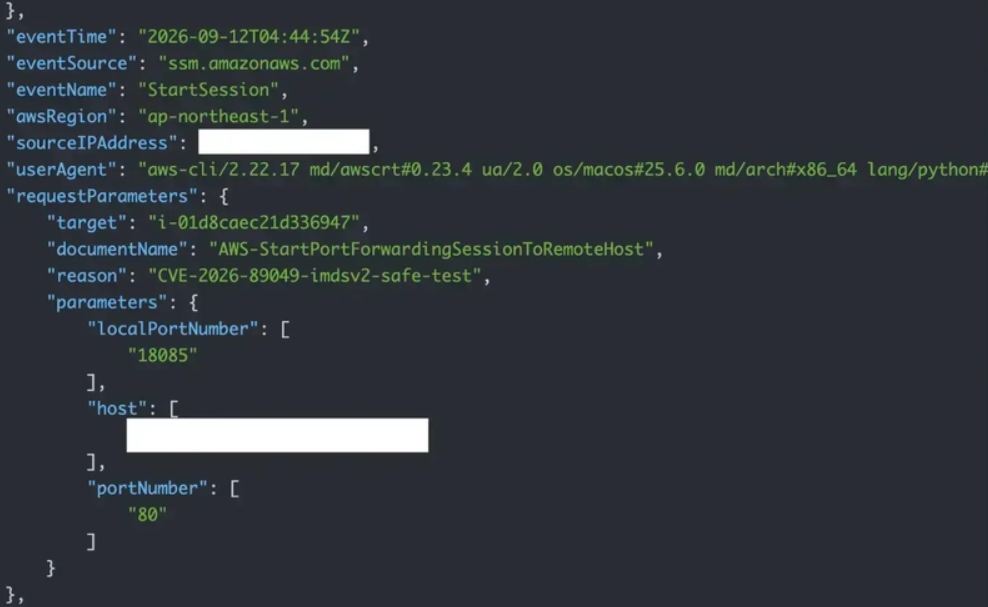
Pay close attention to:
- principalArn
- sourceIPAddress
- target
- eventTime
- parameters.host
- sessionId
Indicators Worth Investigating
The following findings should trigger additional investigation:
Suspicious Host Values
Look for:
- Link-local addresses
- Encoded IP addresses
- Integer-based IP representations
- Hexadecimal IP representations
- Any unusual or non-standard host format
Unexpected Users
Investigate principals that:
- Rarely use Session Manager
- Recently received new IAM permissions
- Are accessing unfamiliar instances
Abnormal Source IP Addresses
Pay attention to:
- New geographic locations
- VPN providers
- External networks not typically used by administrators
Unusual Timing
Sessions initiated:
- Outside business hours
- During holidays
- Immediately following IAM policy changes
may warrant closer review.
Important CloudTrail Limitation
One particularly important discovery during testing is that CloudTrail records the successful creation of the Session Manager session, not the outcome of the subsequent connection attempt.
In practical testing:
- DNS resolution failures appeared successful.
- Denylist rejections appeared successful.
- Successful IMDS access appeared successful.
All generated a valid Session ID and showed no CloudTrail error.
As a result, investigators cannot rely solely on CloudTrail success or failure indicators to determine whether exploitation actually occurred.
Does IMDSv2 Protect Against This?
Many organizations have migrated to IMDSv2 believing it fully mitigates metadata-related attack paths. Unfortunately, IMDSv2 alone does not necessarily eliminate the risk.
Testing demonstrated that an IMDSv2 token could still be requested through the forwarded connection and then used to access instance metadata through the tunnel. While IAM credentials were not retrieved during testing, the behavior suggests that environments relying solely on IMDSv2 should still prioritize patching affected SSM Agent versions.
Remediation Recommendations
If your environment is running a vulnerable SSM Agent version:
1. Update the SSM Agent Immediately
Upgrade all affected instances to: 3.3.4851.0 or later
2. Review Port Forwarding Permissions
Audit IAM permissions granting: AWS-StartPortForwardingSessionToRemoteHost
Apply least-privilege principles wherever possible.
3. Audit Historical Activity
Review CloudTrail records for:
- Unexpected targets
- Suspicious host values
- Unknown source IPs
- Unusual user activity
4. Review Instance Role Permissions
If exploitation occurred, the impact depends on the IAM role attached to the instance. Ensure instance profiles do not have excessive permissions.
5. Monitor Session Manager Activity
Consider creating:
- CloudWatch alerts
- EventBridge rules
- Security Hub detections
for remote-host port forwarding events.
Final Thoughts
Although CVE-2026-89049 carries a critical CVSS score of 9.9, the real-world impact varies significantly depending on how Session Manager permissions are structured within your organization.
In many environments, users granted remote-host port forwarding already have shell access to the same instances. In those cases, the vulnerability may provide little incremental access because IMDS was already reachable from the host itself.
The greatest risk exists in organizations that intentionally separate network-level access from system-level access. In these environments, the vulnerability can blur that boundary by allowing a user with only port-forwarding permissions to potentially access instance profile credentials.
The key lesson is that vulnerability severity scores tell only part of the story. Understanding your IAM design, Session Manager permissions, and CloudTrail telemetry provides a much clearer picture of actual risk. As always, hands-on testing and thorough log analysis remain some of the most valuable tools in cloud security incident response.